Minimally Invasive Neurosurgery of Texas provides minimally invasive spine care in Lewisville and Plano, Texas. Dr. Scott Kutz, a board-certified neurosurgeon and Fellow of the AANS and ACS, leads the practice.
A productive virtual spine visit starts with clear information, a working device, and a space where you can move safely. Preparing for a telemedicine spine consultation means organizing your symptoms, questions, medical history, and available imaging before the appointment.
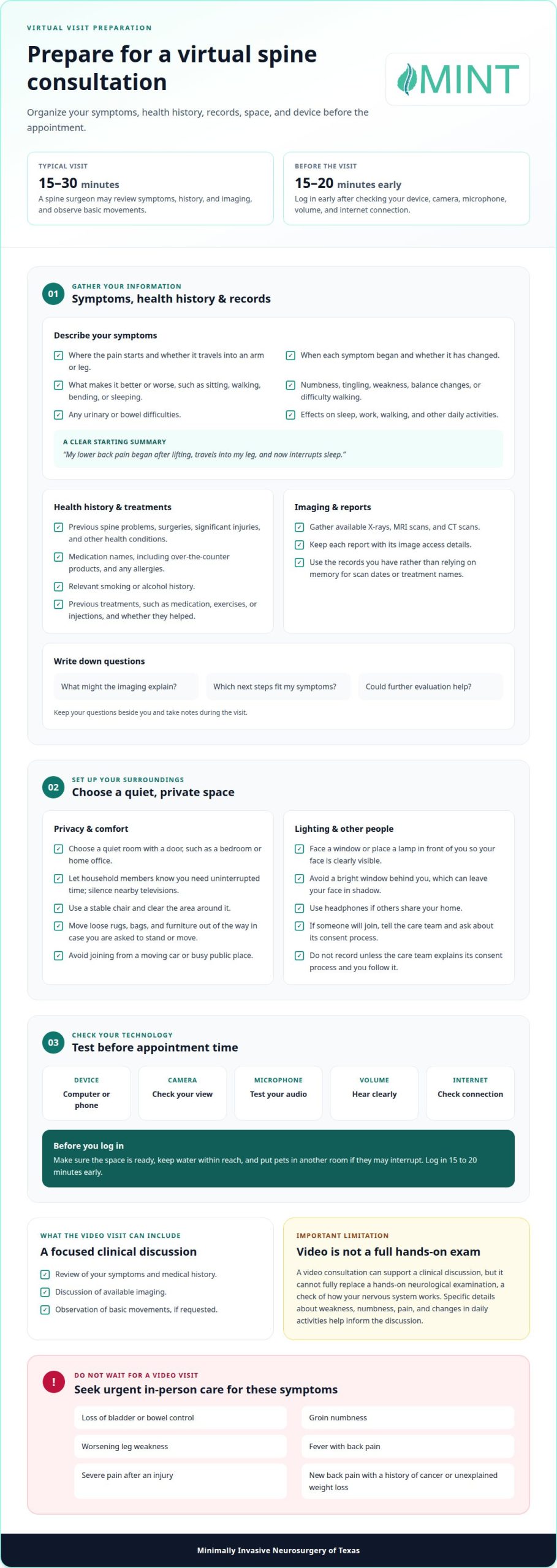
It’s understandable to wonder whether a video visit can give your surgeon a useful picture of your back or neck problem. A typical telehealth visit with a spine surgeon lasts 15-30 minutes and may include a review of your symptoms, medical history, and imaging, along with observation of basic movements. A video visit cannot fully replace a hands-on neurological exam, so specific details about weakness, numbness, pain, and changes in daily activities help inform the discussion.
This guide covers what to gather, how to describe your symptoms, and how to prepare your room and technology. You’ll also learn what to expect if the specialist asks you to move during the visit, so you can focus on your care and next steps.
Key Takeaways
- Organize symptom details, previous treatments, medications, and questions so you can describe how your condition affects daily life.
- Choose a private, well-lit space with enough room to move safely if the specialist asks you to demonstrate a movement.
- Keep available spine imaging and reports easy to access so you can discuss them during the appointment.
- Test your computer or device, camera, microphone, volume, and internet connection before the visit, and log in 15 to 20 minutes early.
- Know that a video consultation can support a clinical discussion, but it cannot fully replace a hands-on neurological exam.
Preparing symptoms, questions, and medical history
Before preparing for a telemedicine spine consultation, make a brief record of your symptoms and their pattern. Note where pain starts, whether it travels into an arm or leg, and when it began. Add what makes it better or worse, such as sitting, walking, bending, or sleeping. If you can, describe its severity in your own words and explain which daily activities have changed.
Include symptoms beyond pain. Tell the specialist about numbness, tingling, weakness, balance changes, or difficulty walking. Tingling, also called paresthesia, can feel like pins and needles. Mention urinary or bowel difficulties, too. For example, explain whether leg weakness makes stairs harder or numbness affects your grip. A video visit cannot include every part of an in-person neurological examination, a check of how your nervous system works, so clear descriptions matter.
- Write down when each symptom started and whether it has changed.
- Describe how symptoms affect sleep, work, walking, and other daily activities.
- List previous treatments, such as medication, exercises, or injections, and whether they helped.
Prepare your medical history in a concise form. Include prior spine problems, surgeries, significant injuries, and other health conditions. List each medication by name, including over-the-counter products, and note any allergies. Tell the specialist about relevant smoking or alcohol history. If you’re new to the practice, these details help the clinician understand your broader health, not just your current back or neck concern.
Gather available X-rays, magnetic resonance imaging (MRI) scans, and computed tomography (CT) scans. Know where to find the corresponding images and reports. Imaging shows pictures of the spine, while a report summarizes the radiologist’s findings. If a relative helps organize your records, ask them to keep each report and its image access details together. Use the documents you have instead of relying on memory for scan dates or treatment names.
Write down your questions and keep the list beside you. Ask what the imaging may explain, which next steps fit your symptoms, and whether further evaluation may help. Start with a brief summary: “My lower back pain began after lifting, travels into my leg, and now interrupts sleep.” This gives the specialist a clear starting point. Take notes during the visit so you can remember the recommendations afterward.
Choosing a suitable space for the appointment
In the United States, privacy and consent requirements depend on applicable rules and the visit’s circumstances; don’t assume one rule covers every recording or participant. Choose a private room, and ask the care team how it handles consent before recording or inviting someone to join. A quiet, comfortable, well-lit location also helps the conversation stay focused.
Finding a Quiet, Private Space
A private space lets you discuss health concerns without nearby people overhearing. Choose a room with a door, such as a bedroom or home office, and let household members know you need uninterrupted time. If you share your home, arrange a quiet period or use a room away from common areas. Keep televisions and other conversations outside the room so you can hear the specialist and respond clearly.
Think about comfort as well as quiet. Choose a stable chair that supports your usual posture, and clear the area around it. If the appointment may include standing or simple movements, move loose rugs, bags, and furniture out of the way first. Avoid joining from a moving car or a busy public place, where interruptions can make a sensitive conversation difficult.
Lighting and Appointment Privacy
Good lighting helps the specialist see your face clearly on screen. Sit facing a window or place a lamp in front of you, rather than behind your head. A bright window behind you can leave your face in shadow. Before the appointment, check the view from your seat and adjust the lighting if your face looks dim.
Privacy also includes people who may hear or appear during the visit. Close the door, silence nearby televisions, and use headphones if others share your home. If a relative will join, tell the care team and ask about its consent process before including them. Don’t record the conversation unless the care team explains its consent process and you have followed it.
Plan for the full appointment, not just the first few minutes. Put pets in another room if they may interrupt, and keep water within reach. If you cannot find a fully private room, choose the quietest available space and explain who may be nearby before discussing personal details. These steps can help you concentrate on the specialist’s questions and instructions.
Benefits of virtual visits for access and convenience
Seek urgent in-person care for loss of bladder or bowel control, groin numbness, worsening leg weakness, fever with back pain, or severe pain after an injury. New back pain with a history of cancer or unexplained weight loss also needs prompt in-person assessment.
A telehealth visit differs from an in-person appointment: the specialist reviews your history and images by video and may observe basic movements. The specialist can assess symptoms and discuss a possible diagnosis, but video cannot fully replace a hands-on neurological examination.
A typical telehealth visit with a spine surgeon lasts 15-30 minutes. Sharing available X-rays, MRI scans, and CT scans beforehand gives the doctor images to review alongside your symptoms. Keep the reports accessible too, so you can discuss findings without searching through files during the conversation.
During a video assessment, the specialist may ask you to walk away from the camera, walk in place, bend forward, or stand on your heels and tiptoes. These movements can help the specialist observe your gait, or the way you walk, balance, and function. They cannot assess every reflex, sensation, or detail of strength that an in-person examination can.
Virtual visits can make it easier to reach a spine specialist when transportation or distance is a barrier. They may also reduce in-person appointments for routine follow-up, including some post-surgical discussions. The specialist can review recovery concerns and decide whether an in-person examination or further imaging is appropriate.
Telemedicine doesn’t mean every back or neck problem needs surgery. Depending on the condition and evaluation, treatment options may include lifestyle changes, spinal injections, or therapy. A video consultation can help organize the next step, such as reviewing imaging, discussing initial treatment, or arranging an in-person appointment.
- Share available imaging before the visit and keep its report nearby.
- Set up the camera so the specialist can observe requested movements safely.
- Write down the doctor’s instructions and follow-up plan during the call.
When preparing for a telemedicine spine consultation, keep its role in mind: it brings a clinical discussion to you and helps guide decisions about what comes next. It does not replace urgent in-person assessment when serious warning signs appear or when the specialist needs to examine you in person.
Preparing a device, internet connection, and audio
Choose a computer, tablet, or phone that can run the video platform. Before the visit, open the meeting link and confirm that your device connects. Install available updates ahead of time, then restart the device if needed. Keep the charger nearby or plug in your device so a low battery doesn’t interrupt your discussion with the specialist.
Test the camera, microphone, and speakers or headphones before the appointment. Check that the camera shows your face clearly and that your voice sounds understandable through the microphone. Play a short audio clip to confirm the volume works. If you use headphones, connect them before opening the visit link. These checks can catch muted audio, blocked camera access, or an incorrect input device before the specialist joins.
A stable internet connection supports clear video and sound. A telemedicine evaluation can use an internet connection with upload and download speeds of 5 megabits per second. We recommend a wired internet connection; Wi-Fi can work if it supports a video conference in your chosen location. If the picture freezes, move closer to the router or connect your device to a stronger available network.
- Charge or plug in your device before opening the appointment link.
- Test the camera, microphone, and volume with the same device you’ll use.
- Close unrelated apps and disable screensavers that could interrupt the visit.
Close streaming services, games, and other apps before connecting. They can compete for your device’s attention or internet capacity during the call. Turn off screensavers and automatic display settings that could obscure the camera view. If you use a work computer, close confidential documents and notifications so private information doesn’t appear on screen.
Log in 15 to 20 minutes beforehand to test the connection and device. This gives you time to address a forgotten password, browser permission, or audio setting without using appointment time. If the video platform asks for camera or microphone access, allow those permissions for the visit. Keep the appointment link and any sign-in details close by, and leave the device on a stable surface while you connect.
Test the camera image before the call. Sit facing a light source rather than placing a bright window behind you. If your face appears shadowed, move a lamp in front of the device. A clear image helps the specialist observe you during the video consultation without repeated adjustments.
How should I prepare for a virtual spine consultation?
For a virtual spine exam, place your camera where the specialist can see your face and upper body. Keep room to stand 7 to 10 feet away so the clinician can view your whole body if they ask you to move farther from the camera. Wear comfortable clothing that lets you move easily; choose a top you can adjust to show your back if you feel comfortable.
A video visit can show basic movements, but it cannot fully replace a hands-on neurological examination. The specialist cannot check reflexes, which are automatic muscle responses, or assess detailed muscle strength, sensation, which is your ability to feel touch, and tenderness in the same way. Tell the specialist if a requested movement concerns you, and don’t attempt anything that feels unsafe.
Prepare the space for movement before the appointment. Clear obstacles from the floor, and keep a stable chair or counter nearby for support. A trusted relative or friend can stay with you during the examination if you need help with balance or technology. Tell the specialist about any concern before trying a movement.
Keep a few simple items within reach in case the specialist asks you to have them ready: paper and a pen for notes, a rubber band or hair tie, and a heavy object such as a book or jug of water. The specialist may use an object to guide a simple strength check. Don’t use anything that feels difficult to lift or hold securely.
Follow the specialist’s directions rather than rehearsing examination movements in advance. The specialist may ask you to walk in place, bend forward, squat, balance on one leg, or stand on your heels and tiptoes. Perform movements only in a clear area, with support nearby if your balance feels uncertain. Say right away if pain or weakness makes a movement difficult.
- Set the camera at eye level, then check that your body stays visible when seated.
- Keep your computer or phone stable, with enough room to reposition it safely.
- Have your notes and requested household items nearby before the video begins.
Use the secure appointment connection provided for the visit, and keep your screen private. If the video freezes or the specialist cannot see a movement clearly, pause and reconnect rather than continuing without guidance. The key takeaway: prepare the camera, clothing, space, and support items, then let the clinician direct each part of the virtual exam.
Minimally Invasive Neurosurgery of Texas
Minimally Invasive Neurosurgery of Texas helps patients evaluate spine concerns and understand possible next steps. If back or neck symptoms continue to affect work, sleep, walking, or other daily activities, a specialist can review your history and available imaging. That information helps frame a discussion about whether further evaluation or spine surgery may fit the problem.
Dr. Scott Kutz is a board-certified neurosurgeon and Fellow of the AANS and ACS. His practice focuses on spinal care, including Minimally Invasive Spine Surgery (MISS), Endoscopic Spine Surgery (ESS), and Artificial Disc Replacement. The appropriate approach depends on your diagnosis, symptoms, and imaging findings, not simply on whether the appointment is virtual or in person.
A virtual discussion can help organize those details, but it cannot provide every part of a hands-on neurological examination. Be ready to discuss your symptom pattern, prior treatments, medications, medical history, and available imaging reports. Clear information helps the specialist understand how your concern affects daily function and what questions need attention. The discussion may clarify whether further evaluation or another next step is appropriate.
Spine surgery is not the automatic outcome of a consultation. The evaluation considers the patient’s symptoms alongside the clinical findings and imaging, then connects those details to appropriate options. When surgery becomes relevant, minimally invasive spine techniques offer approaches that address spinal conditions through smaller incisions. The specialist can explain how a specific approach relates to the patient’s condition and goals.
Patients in Lewisville and Plano, TX, can use an organized consultation to discuss persistent spine symptoms and understand the path ahead. Prepare focused questions about what the imaging shows, what further evaluation may involve, and how treatment options relate to your daily activities. This helps keep the conversation centered on your needs rather than assumptions about a diagnosis or procedure.
To discuss your spine concerns, contact Minimally Invasive Neurosurgery of Texas.
Frequently Asked Questions
What information and records should I gather before a telemedicine spine consultation?
Gather a concise medical history, current medication list, allergy information, prior spine treatment details, and records related to your current concern. Include relevant surgeries and other conditions that could affect care. For example, note the name of a previous procedure and whether it changed your symptoms. If a relative helps organize your records, ask them to keep documents together so you can find details quickly during the appointment.
What symptoms and questions should I discuss with a spine specialist?
Describe what changed, when it changed, and how it affects a specific activity. For example, explain whether pain begins after sitting at work or interrupts sleep, and whether it stays in one place or travels. Ask what findings could explain the pattern, what the next evaluation involves, and which changes should prompt follow-up. A short, specific example gives the specialist more context than a general description of discomfort.
How can I share MRI, X-ray, or CT images with a telemedicine spine doctor?
Follow the image-sharing instructions for your appointment, and send the actual study when possible, not only its written report. The report summarizes findings, while the images let the specialist review your spine directly. If the imaging center gave you a disc or access code, keep it available and follow the care team’s instructions for sharing it. Match each study with its date and body area, such as a lumbar MRI.
Does insurance cover telemedicine spine consultations, and what are typical costs?
Coverage and out-of-pocket costs depend on your insurance plan and how it classifies the visit. Review your plan’s telehealth benefits and ask your insurer about specialist visits, deductibles, copayments, and referral requirements. What you may owe can differ from the cost of an in-person appointment under the same plan. Confirm the applicable benefit before the appointment rather than assuming every virtual visit receives identical coverage.
What technology and internet connection do I need for a telemedicine appointment?
Use a computer, tablet, or smartphone with a working camera, microphone, speakers, and reliable internet. Before the appointment, open the meeting instructions and confirm your browser or app can access the camera and microphone. If you use headphones, test them with the device you’ll bring to the visit. Keep a charger close and silence notifications so calls or alerts don’t interrupt your conversation with the specialist.
How do I follow up or arrange an in-person exam after a virtual spine consultation?
Before ending the visit, note the recommended next step, who will arrange it, and which records or images you should bring. If the specialist recommends an in-person examination, follow the care team’s scheduling instructions and bring your notes. Follow the specialist’s guidance for your individual care. General online information, including this article, is for informational purposes only and is not a substitute for professional medical advice or an examination.